 Orca Systems
Not live for guests. Runs on a test database at our own hotel. Not on sale yet.
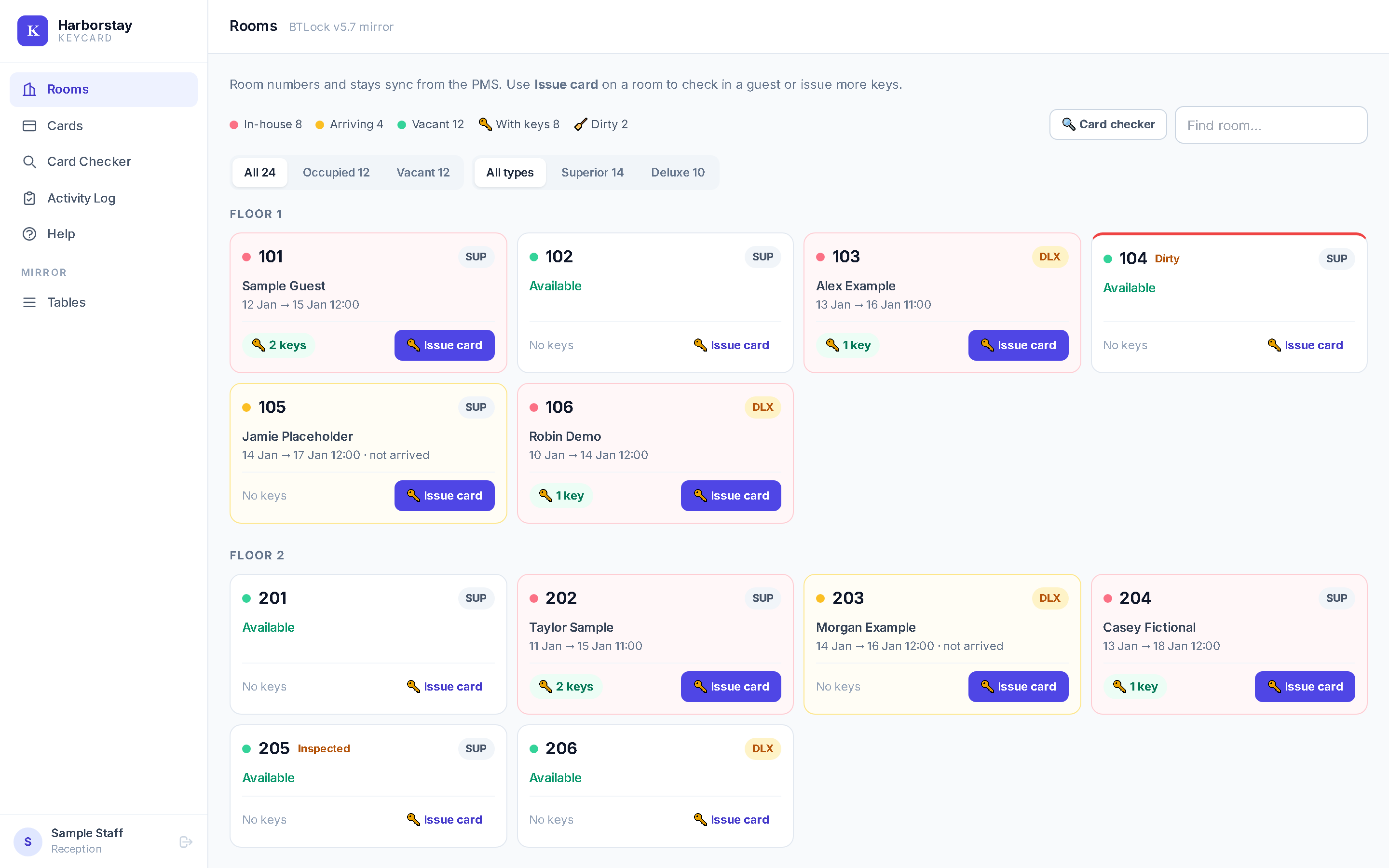
Issue key cards for Be-Tech locks from your room grid.
Reception clicks a room, checks the guest and dates filled in from the PMS, and writes the card.
The problem it targets
Hotels with Be-Tech locks make key cards with the lock maker's own Windows program, BTLock, on one front-desk PC.
-
It is a separate program from the PMS
Reception types the guest and the dates a second time. A card can be cut for a room that has no guest in the PMS, and nobody notices. Keycard fills in the stay from the PMS.
-
It lives on a PC of its own
BTLock runs on one front-desk PC, apart from the PMS. It has to be looked after separately from the hotel system.
-
It is a desktop program on one PC
Keycard is a web page. It opens from any approved computer in the hotel. From outside, it needs Google sign-in and an authenticator code.
Where it fits
It is not a general key-card product. It works with one PMS and one family of locks.
This PMS only
It works with the Orca Systems. It reads that PMS's room and stay tables, writes two small tables back and uses its extension API for housekeeping. A hotel with another PMS would need development first.
Be-Tech locks and one card-writer
It works with Be-Tech (BTLock) MIFARE Classic door locks and an ACR120 card-writer, on USB or serial. You need blank MIFARE Classic cards. Nothing is changed on the doors.
One hotel, your own Windows computer
One installation serves one hotel. The app runs on the hotel's own Windows computer, the one that runs the PMS. Each front-desk PC with a card-writer needs the bridge.
One system for each room
BTLock and Keycard must not both issue cards for the same room. Each new stay writes a newer code into the lock, and the system used last at the door switches the other's cards off. We saw this at the door on 23 and 28 October. Choose one system for each room.
How a key is made
-
Click a room
Each room shows if it is in house, arriving, vacant or dirty, and how many keys it has. Press Issue card.
-
Check the stay
The guest and the dates are already filled in from the PMS stay. Change them if they are wrong.
-
Put a blank card on the writer
The card-writer is plugged into that PC. A small helper program, the bridge, lets the web page talk to it.
-
Hand over the key
The request is recorded in the app. If the PMS shows no check-in for a card made here, the fraud alert fires.
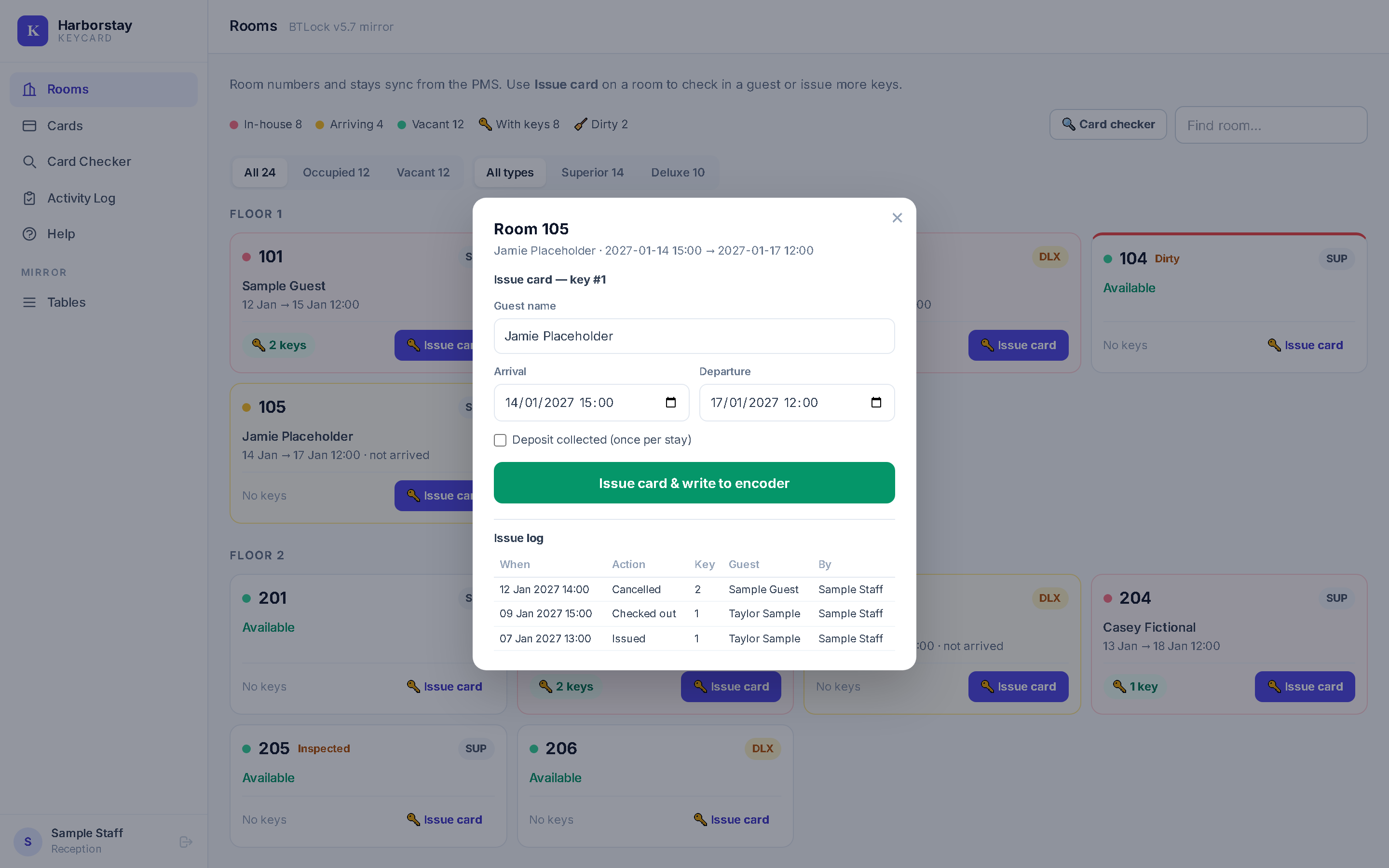
- The Rooms pop-up is not door-proven yet. The October door tests used cards from a separate test page. The pop-up reception would use builds its cards differently and has not been switched to the tested method.
What it does
Six things, each limited to what we have checked.
Issue a key from the room grid
Press Issue card on a room, check the guest and dates, and the card is written to the card-writer on that PC.
More keys, new keys, extend, check out
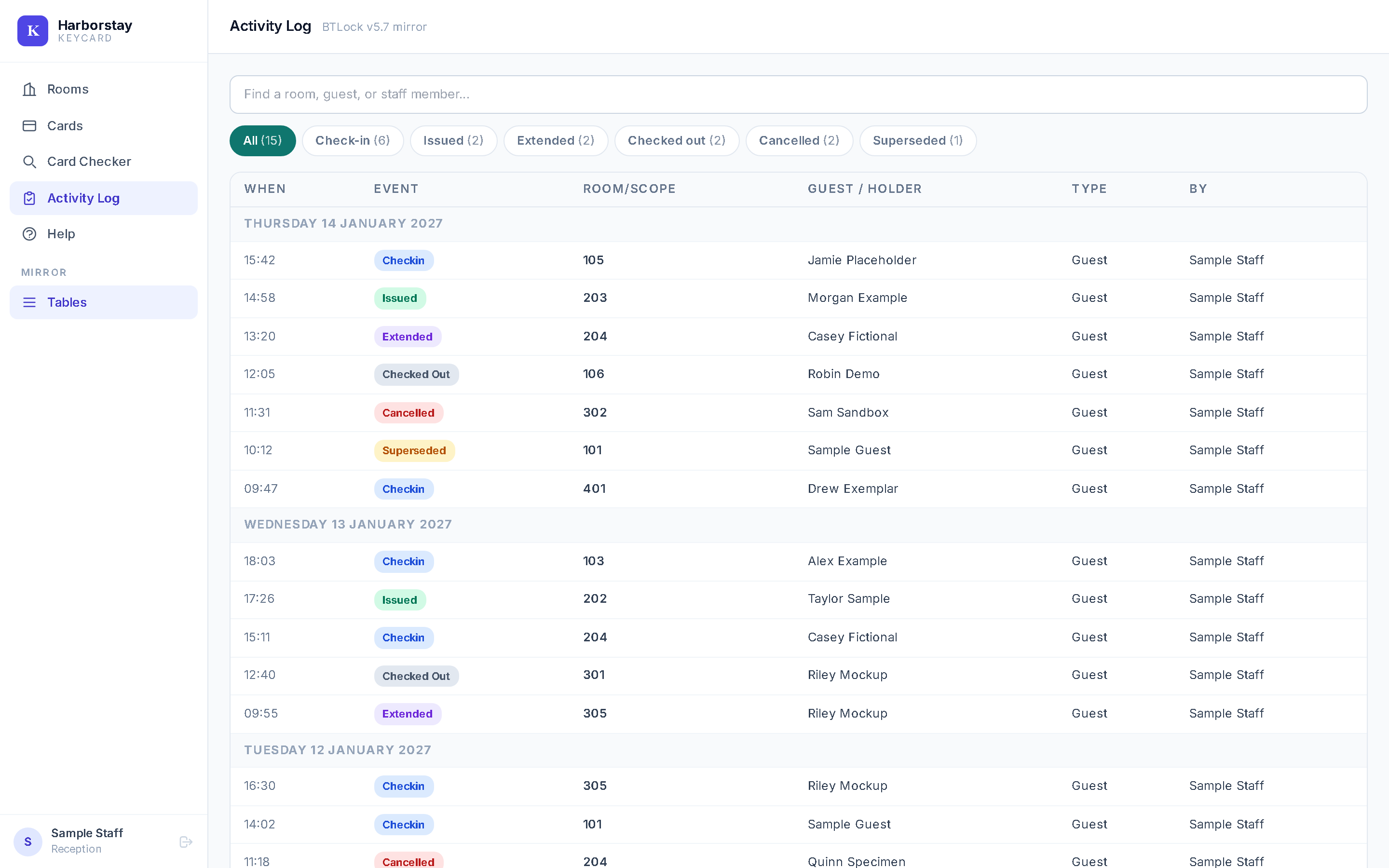
Add a second key (Issue More), start a fresh set (Issue New), push the departure out (Extend) or check a whole room out. Each one goes into the Activity Log. Extend and Check out change the record only. They do not rewrite the card or switch it off.
Reads the PMS, does not edit its guest data
Rooms, guest names, stay dates and housekeeping status come from the PMS. Keycard writes back two things only: a line saying a key was issued (after Mark issued), extended or checked out, and the fraud alert.
Fraud alert
If a key is cut for a room and the PMS shows no check-in within about 5 minutes (you can change this), admins, managers and accountants get a top-priority alert in the PMS inbox. Only cards made with the Rooms pop-up, or marked as issued, are watched.
Staff logins
Each person has their own login, with three roles: admin, manager and reception. Inside the hotel they use a password. From outside it is Google sign-in plus an authenticator code. Only computers an administrator has approved can open it on the hotel network. A Login Audit page lists sign-ins. If a number is set, the owner gets a WhatsApp message on every sign-in.
Card checker
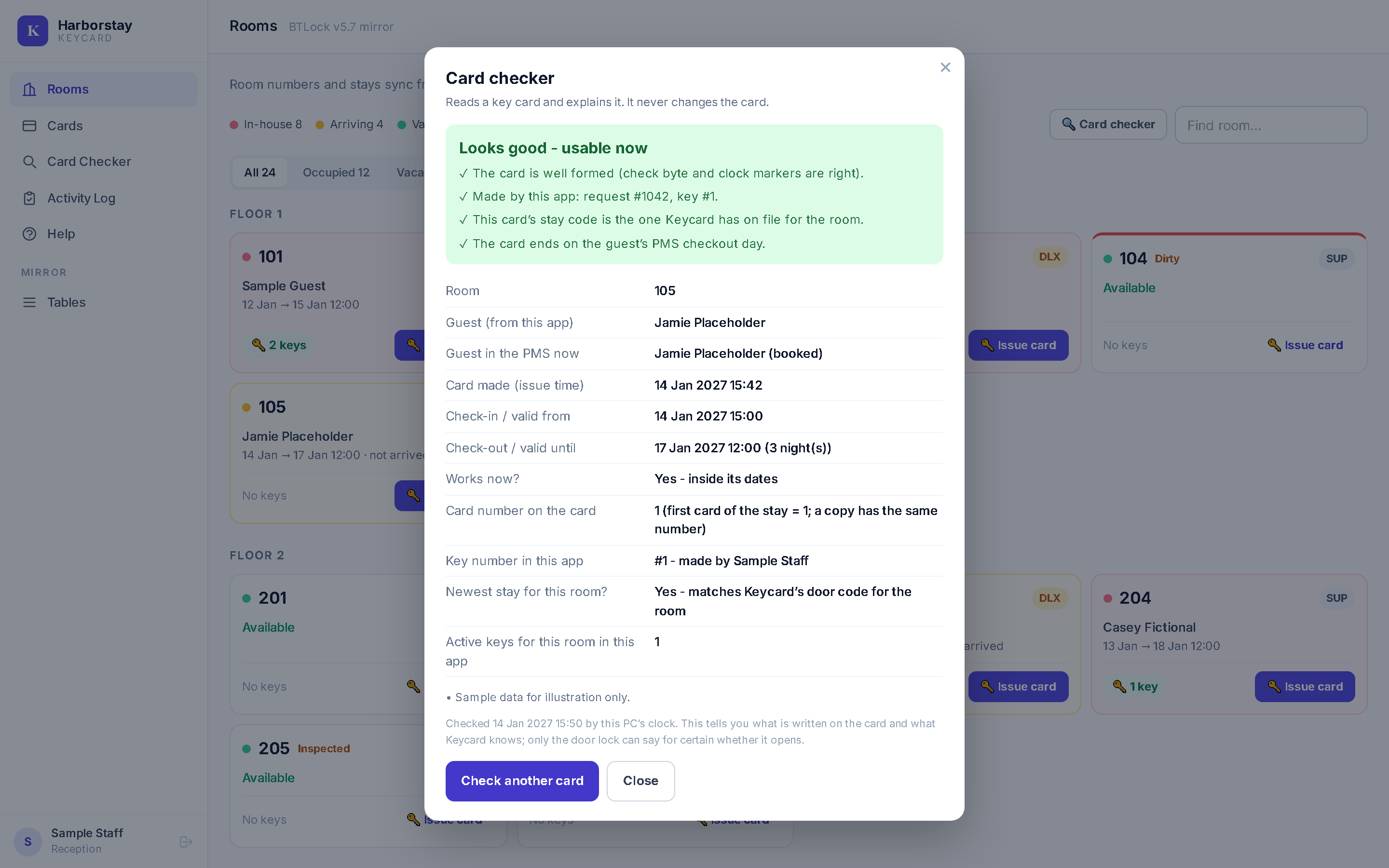
Put any key card on the card-writer. The checker gives a verdict, then says who the card is for, when it was made, from when to when it works, whether it works now, whether it is the newest key for the room and whether it fits the guest's PMS stay. It never changes the card.
It cannot say when the card was last used. Cards do not record that. Only the door lock can say for certain whether a card opens.
The hotel's card workload
From the hotel's card history. These count cards written through BTLock, the program Keycard is meant to take over from, room by room. Keycard's own use cannot be counted yet, because it runs on a test database.
- Cards written, June 2022 to October 2026
- 55,507
- In 49,946 stays.
- Cards a day, 23 July to 21 October 2026
- About 41
- 3,720 cards in 2,671 stays over 91 days. One card about every 35 minutes.
- Stays with a second card written, 2025
- 5 in 100
- Over all history it is 8.5 in 100.
- Stays with a second card written, 23 July to 21 October 2026
- 29 in 100
- Usually within seconds or minutes of the first. Not a saving, and we do not know why the rate rose.
- When cards are cut. Over the same 91 days, 37% were written between 13:00 and 18:00, 29% between 07:00 and 13:00, 26% between 18:00 and midnight and 9% at night. The busiest hours are 11:00 to 15:00.
- Read the second-card figures with care. BTLock's log cannot tell a lost-key replacement from an extra key or a re-write. We have no figure for time saved per card, and we give none.
What the pilot showed
In October 2026 we tested the card method at real doors. The cards came from a test page, not from the Rooms flow, so we call it a pilot.
- Cards opened doors. A new check-in card opened doors on 21 and 23 October. A replacement card opened a door on 23 October.
- How the lock treats a new stay. With test cards, a card for a new guest stopped the earlier guest's keys at the door (door 407, 28 October). In our one test, an older card of the same stay still opened. The Rooms pop-up does not do this yet, and Issue New does not stop old keys.
- Not every test passed. On 28 October one door refused every test card. We are still tracing why.
- The knowledge page. For the technician, the app lists what we know about how cards and locks work, with the evidence for each claim. It holds 14 claims checked against the hotel's own card history, and the page shows openly the one the doors refuted.
What it does not do
Replace BTLock today
It is meant to take over from BTLock once the hotel switches the live flow. That has not happened.
A room is issued from one system only.
Touch the card or the lock
Extend and Check out change the record, not the card. Issue New archives the old keys in the app. In our one test, an older card of the same stay still opened at the door.
It does not show when a card was last used.
Watch every card
The fraud alert covers cards made with the Rooms pop-up or marked as issued. Cards written by BTLock, or from a request that is still pending, are not watched.
Fit other systems
It does not work with other locks, another PMS or several hotels at once. Its screens are in English. Only the Help page also has Thai and Burmese. We give no figure for time saved or money saved.
Where it stands
- Live for guests
- No. It runs on the hotel's Windows computer against a test database, never the live PMS database.
- Door tests
- A pilot in October 2026, with test cards. The Rooms and Cards pages are not yet built the way those cards were, so we do not call them door-proven.
- Going live
- The owner has not decided yet. It needs a choice, room by room, between BTLock and Keycard.
- Other hotels
- It is installed nowhere else, and no other hotel has used it.
- On sale
- Not yet. We have not set a price.
Questions
Which PMS does it work with?
The Orca Systems only. Another PMS would need development first.
Do I keep my locks? What hardware do I need?
You keep them, but they must be Be-Tech (BTLock) locks. Nothing changes on the doors. You need an ACR120 card-writer on each front-desk PC that makes keys, blank MIFARE Classic cards and a Windows computer for the app.
Can I keep BTLock as a backup?
Not for the same room at the same time. The system used last at the door switches the other's cards off. A room is issued from one system.
What happens if the server or the network is down?
The doors keep working, because the locks work offline. The card-writer cannot be used from the web page, so no new cards can be cut until the server is back. We have not written a fallback procedure yet.
Where is guest data kept?
Keycard's records are in its own database on the hotel's server. The PMS data stays in the PMS.
Are the screens in Thai?
No. The screens are in English. Only the Help page also has Thai and Burmese.
Is it ready for my doors today?
No. It is not live, it has had a pilot with test cards, and the Rooms and Cards pages are not yet door-proven. It is not on sale.
Can I see it? How much is it?
There is no demo for visitors today. We have not set a price, because it is not on sale.
Tell us about your hotel
We will say plainly whether your PMS and locks fit. It is not available to order yet.