 Orca Systems
Installed at our own hotel, on part of the rooms. Not on sale yet.
Know when an empty room is running a heavy load.
Reads each metered room's power about every 45 seconds, when the meter answers, and checks it against your check-ins.
What it does
A Windows service that runs next to the PMS. It never posts to a folio and does not bill guests.
-
Reads the meters and the PMS
It polls each mapped meter over the hotel network about every 45 seconds, when the meter answers. It records watts, amps and volts for each room. Every cycle it asks the PMS whether the room has an in-house stay, its housekeeping status and whether a booking arrives today.
-
Adds up energy from watts over time
While a room is occupied, the energy is added to the stay. Any gap longer than 10 minutes counts as zero and shows as skipped hours. It is never filled in.
-
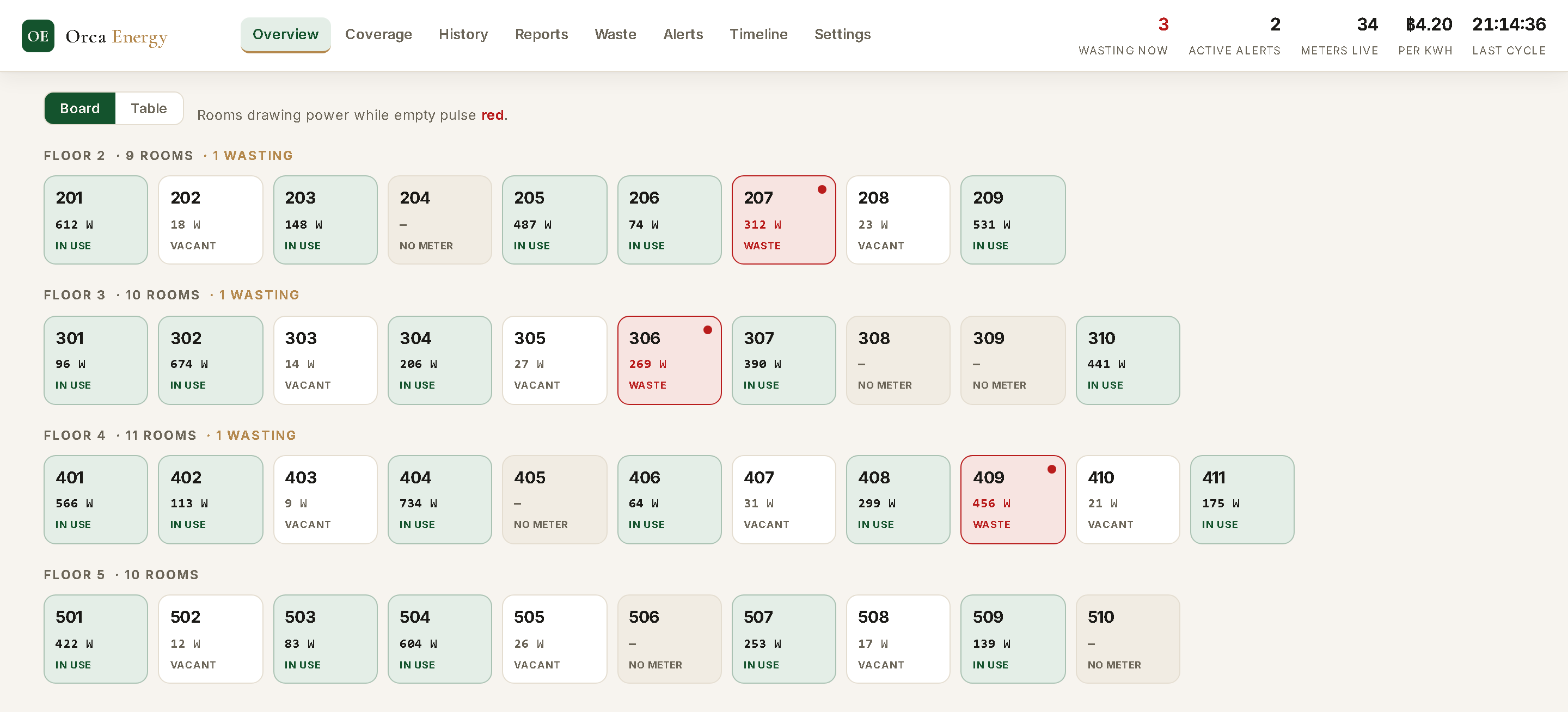
Shows a board and reports
A board groups rooms by floor. Daily, monthly and yearly reports per room come with print and CSV download. Inside the PMS there is an Electricity page and a usage card on each reservation.
How the alert works
One kind of event sends a notification: a room has run a heavy load while the PMS shows nobody in it.
-
Read
Each cycle, the service records every mapped room's power.
-
Check the PMS
The room has no in-house stay, is not out of order and has no arrival today.
-
Watch for 30 minutes
Most readings in a rolling 30-minute window are at or above the heavy-load level.
-
Notify
One row goes to the PMS notification feed. While the room stays flagged, it repeats at most once an hour.
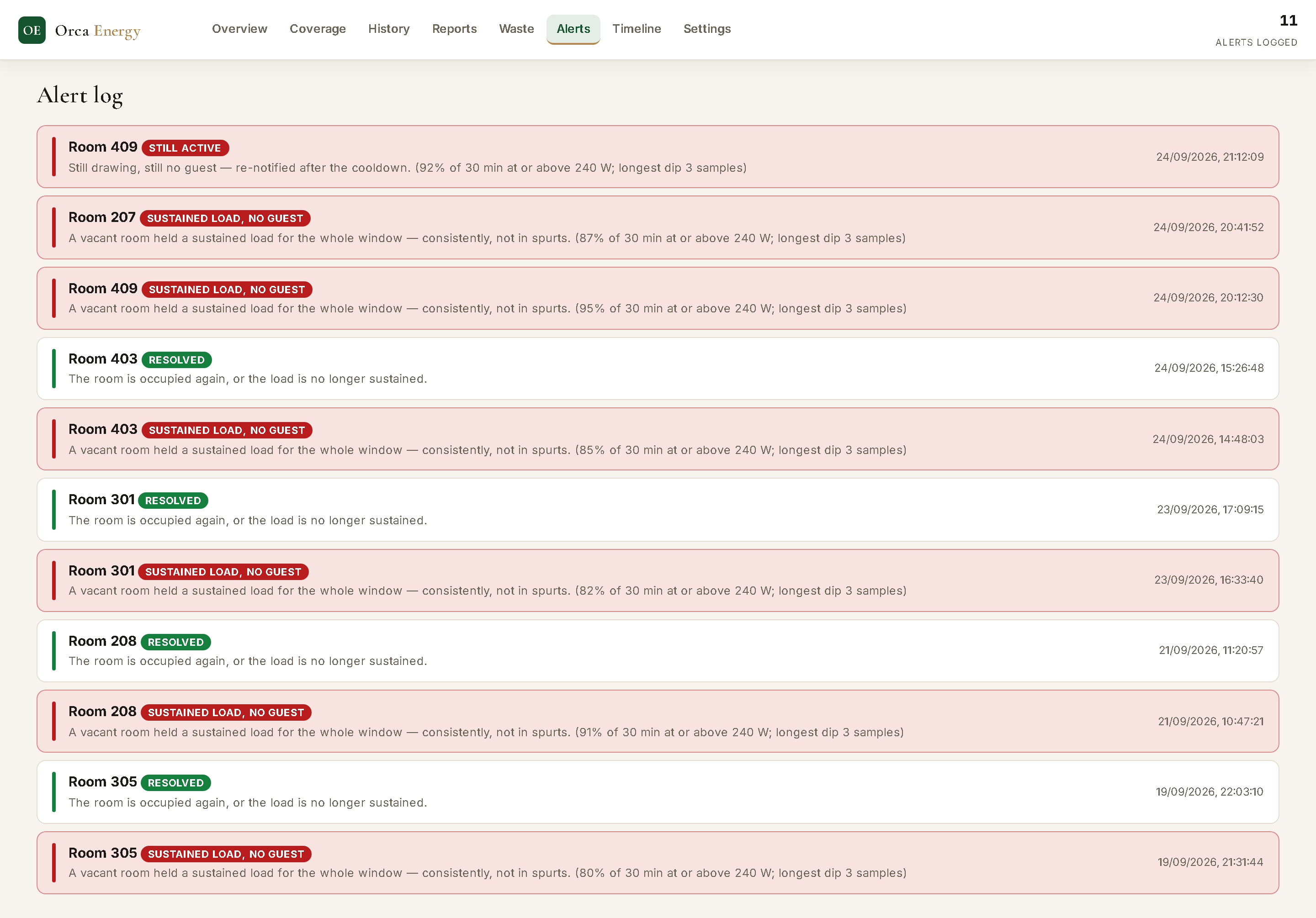
- We have not proved the alerts are right. From 13 September to 9 October 2026 the rule opened 153 episodes on 40 rooms at our hotel. Most opened between 08:00 and 17:00, which looks like cleaning visits or early arrivals. We have not checked them against housekeeping records.
- There is no AI in it. It uses fixed levels, fixed windows and one fixed action.
The exact rule
A room raises the alert when all of these hold: no in-house stay, not out of order and no arrival booked today; at least 75% of the readings in a rolling 30-minute window are at or above the heavy-load level; no long break below it; and at least 80% of the expected readings exist.
The levels are measured, not guessed. Our install step reads the power samples from your own rooms and separates standby from air conditioning running. It will not suggest levels from less than 24 hours of data, and the alert stays off until both levels are set. Every number can be changed in Settings, and each change is logged with a name. The notification goes to the roles set at install.
Other events only go on a timeline: a short heavy-load run, standby, or heavy load in a room that is rightly occupied. If at least 30% of the meters drop at once, it logs a power-supply event and mutes the alert until they return. The rule does not use the housekeeping "cleaning in progress" status.
Slide the screen sideways to read all of it.
The empty-room energy report
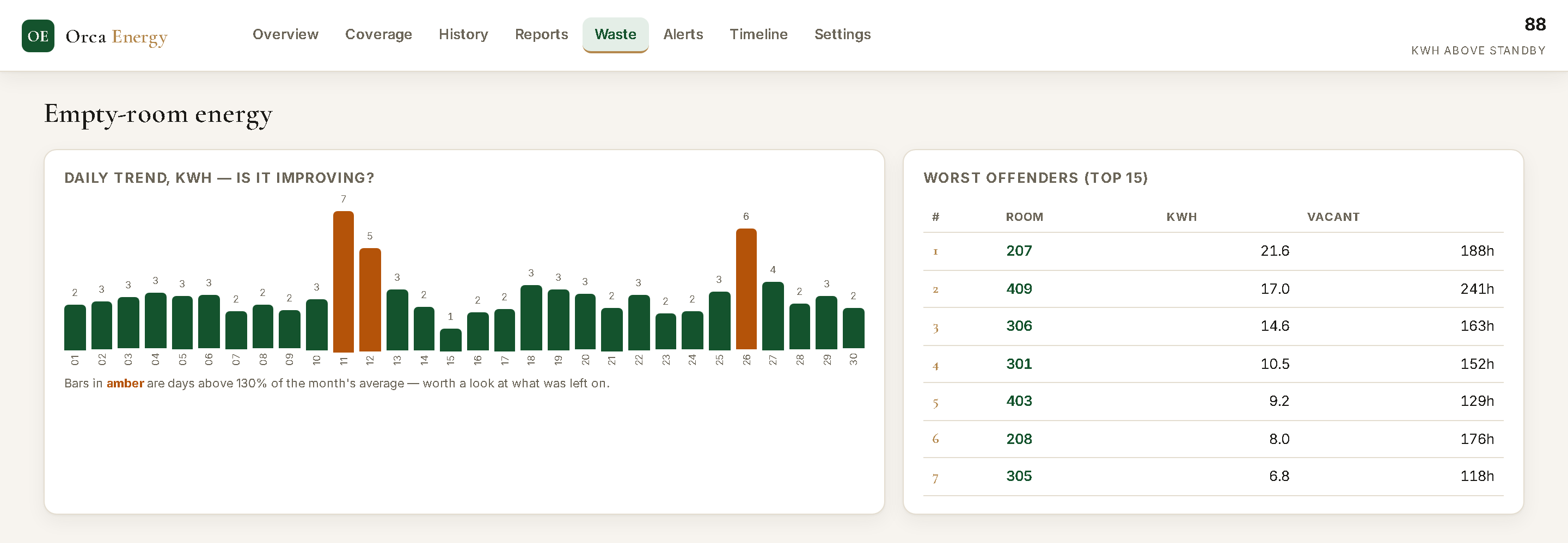
It adds up the energy drawn above standby level while a room had no in-house stay. You see it per room, per day and per month, in kWh. The baht line on a report is kWh times the rate per kWh you enter. It is not a bill and not a saving.
- Read it as an upper bound, not a saving. "Empty" only means the PMS showed no in-house stay at that moment. That includes cleaning, maintenance, cooling a room before a same-day arrival and rooms that are out of order. If the PMS cannot be reached, every room counts as empty.
Slide the screen sideways to read all of it.
Coverage and the other pages
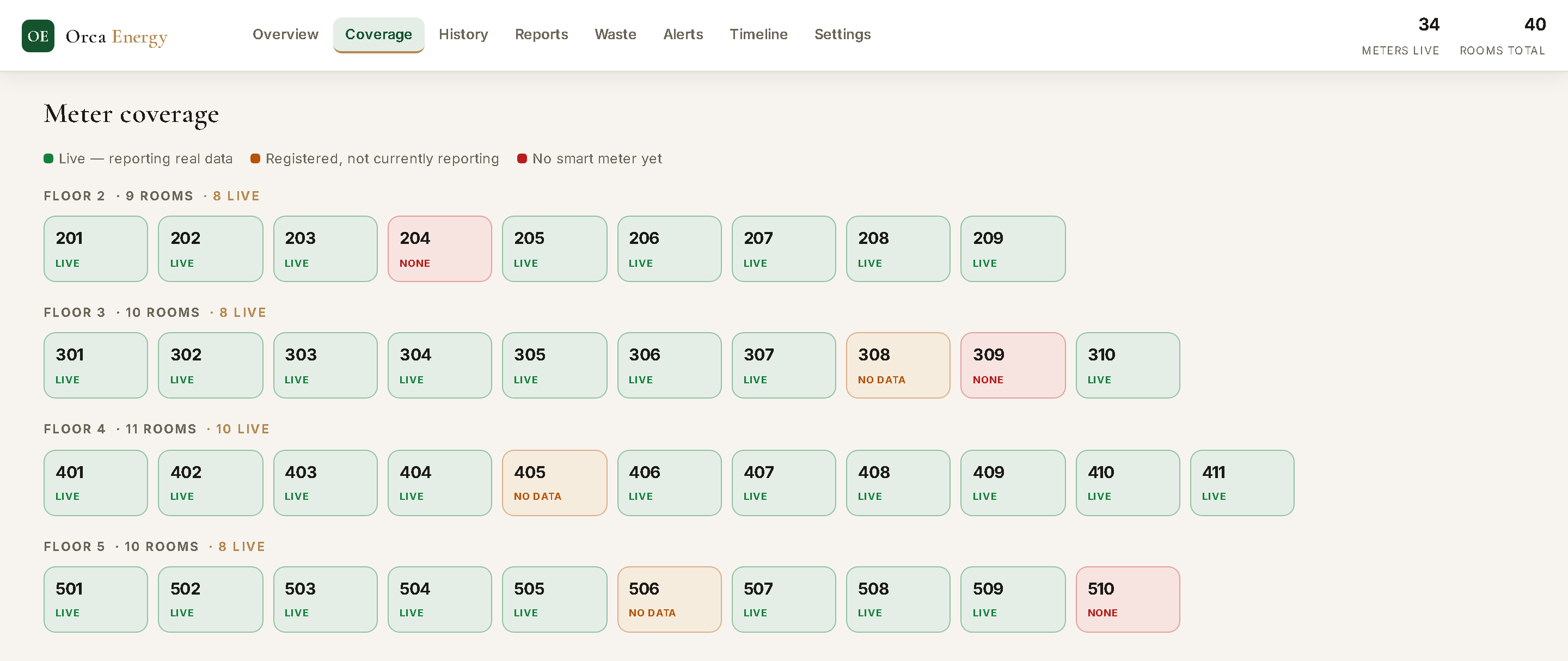
The Coverage page shows which rooms answer, which are registered but silent and which have no meter.
The add-on has eight pages of its own: Overview, Coverage, History, Reports, Empty-room energy, Alert Log, Timeline and Settings.
What you need
Meters
One Tuya Wi-Fi smart meter with a built-in relay for each room circuit you want to watch. We do not list meter models or prices here. Ask us.
You also need a Tuya app account that owns the meters and a Tuya IoT cloud project in the same data centre. They are needed only to fetch each meter's local key.
Network
The meters must join a Wi-Fi network that the add-on computer can reach. At our hotel they sit on several subnets, and the computer could reach only some at first.
A meter moved to another network has to be paired again. A sign-in page on the Wi-Fi blocks meters, so they need a bypass. Our scripts find meter addresses from a MikroTik router. A different router needs a different way.
A computer and this PMS
A Windows computer that stays on and can reach both the PMS and the meters.
The add-on is written against this PMS's tables and room list. It does not work with another PMS.
Someone to install it
At our hotel the development team did it. It took about ten weeks from the first meter to a working alert. There is no install guide for the current version yet.
What it does not do
Money and control
It does not bill guests and posts nothing to a folio. Nothing it shows ties to an electricity bill.
It never switches a room off by itself.
Coverage and accuracy
It watches only rooms with a working meter. At our hotel that is part of the rooms.
Gaps add no energy, so totals are lower bounds when a meter was out of reach.
Alerts
Alerts reach people only as PMS notifications. There is no email, LINE, WhatsApp or SMS, and no daily or monthly summary. A meter that goes silent shows only as a row on the timeline.
Fit and security
It is English only. Bangkok time (UTC+7) and "floor is the first digit of the room number" are fixed in the code.
It has a sign-in page. It has not had an independent security check.
Where it stands
- Installed
- At our own hotel, on part of the rooms. It has not been installed at any other hotel, and it is not on sale yet.
- Coverage
- Readings depend on each meter answering, and at times only a few meters answer. Coverage is partial and changes from day to day.
- Alerts
- We set the heavy-load level from 598 hours of readings at our hotel. How often an alert points to a real loss has not been measured yet.
- Written for our hotel
- Our hotel's name, time zone, room list and router are in the code. Another hotel needs meters, network work and development before it could run.
Questions
Does it bill my guests for electricity?
No. It records energy against a stay for information only. Nothing is posted to a folio.
What do I need?
A Tuya Wi-Fi smart meter in each room you want to watch, a network the add-on computer can reach, a Windows computer that stays on, this PMS, and a Tuya account to fetch the meter keys. Meter prices are not listed. Ask us.
How does it decide a room is wasting power?
A room with no in-house stay, not out of order and with no arrival booked today draws at least the heavy-load level for 75% of a 30-minute window, with no long break. The level is measured from your own rooms at install.
Does it use AI?
No. It uses fixed numbers, fixed windows and one fixed action.
Who gets the alert?
It goes to the PMS notification feed, for the roles set at install. It does not send email, LINE, WhatsApp or SMS.
Can my hotel use it today?
Not yet. It is installed at our own hotel on part of the rooms and has not been installed anywhere else.
Tell us about your hotel
We will say plainly whether your meters, network and PMS fit. It is not available to order yet.