 Orca Systems
owner / settings /
Stop paying someone else to touch your own settings.
Rate changes, new reports, configuration tweaks: made by you, on your own screens, when you need them. No ticket, no consultant invoice.
How to read this page
- Ticket
- A change that goes through a request: you describe it, someone else schedules it, it arrives later.
- Toggle
- A change you make yourself, on the screen shown, at the moment you need it.
Rates and seasonal pricing
/inventory/cm-rate-formula
Flat rates, seasonal date overrides and rate adjustment formulas on top of your channel-manager rates, edited directly. Open and close sale and set seasonal inventory caps from the same side of the desk.
 1
2
3
4
What the numbers mean
- Adjustment. A percentage discount or markup.
- When it applies. Stay dates, booking dates and a minimum lead time.
- On or off. The rule's status, one click away.
- Edit or delete. From the row, no request.
An early-bird discount for next season.
- describe it
- wait for a slot
- pay for the change
Add the rule: minus 10 percent, stay dates, booking dates, a 30 day minimum lead. Switch it on.
- you, on this screen
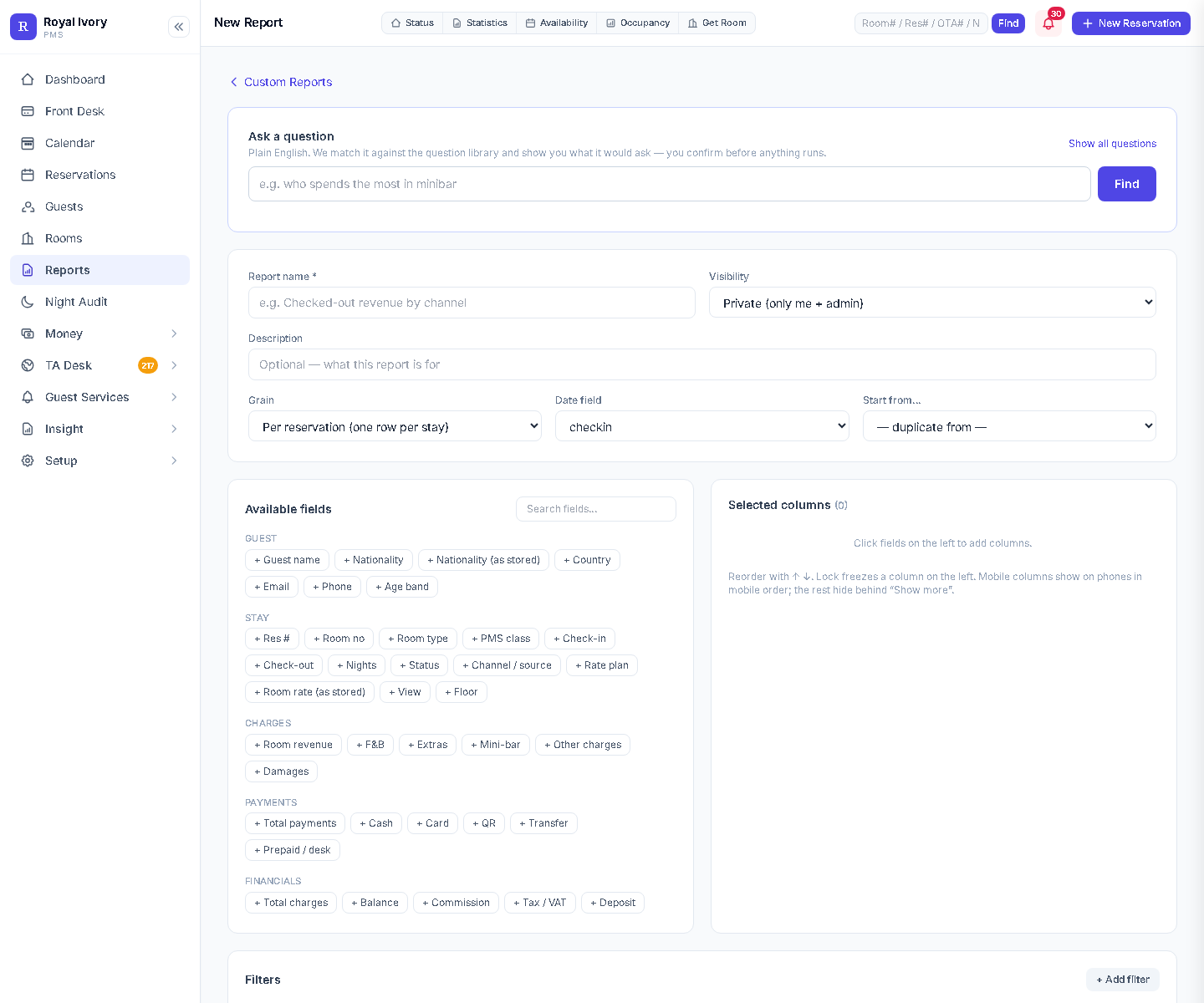
Reports you build yourself
/reports/builder
Choose the columns, the grouping and the date range. Save the report and run it again next month. Ready-made owner and manager reports sit in one hub next to it.
 1
2
3
4
What the numbers mean
- Ask a question. Type it in plain English and confirm what it would run.
- Name and visibility. Name the report and set who can see it.
- Available fields. Guest, stay, charges, payments and financials, added with a click.
- Selected columns. Reorder them, lock one on the left.
Every report in the hub exports to CSV from its own page.
One more column on a monthly report.
- file a request
- wait for a developer
- check it next month
Click the field. It is a column. Save the report and rerun it whenever you like.
- you, on this screen
Ask your own data a question
/reports/ask
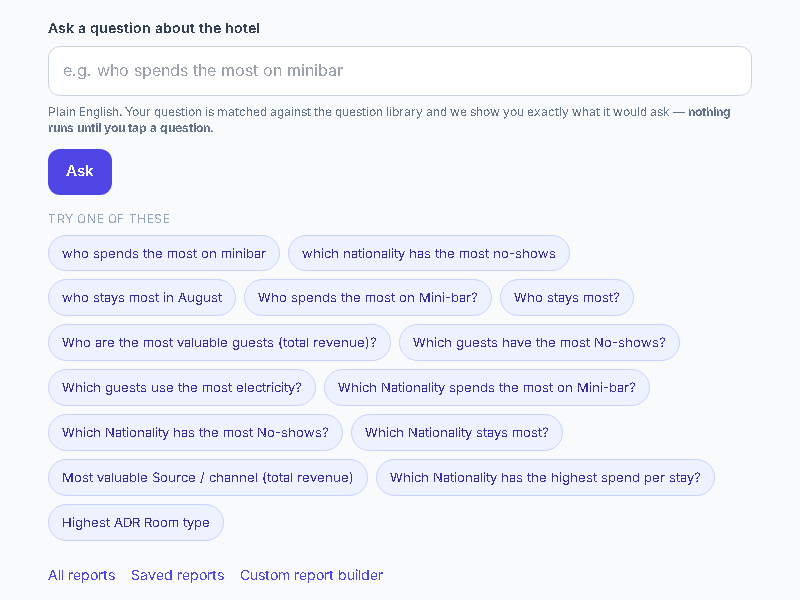
Type a question about your hotel. It is matched against a question library and the screen shows you exactly what it would run, so nothing is guessed on your behalf.
What the numbers mean
- The question box. Plain English, for example who spends the most on minibar.
- Ask. Nothing runs until you tap a question.
- Suggested questions. A starting point if you are not sure how to phrase it.
- Saved reports and the builder. One click to the next step.
 1
2
3
4
Which nationality has the most no-shows?
- ask someone to pull it
- wait for the file
Type the question, read what it would ask, tap to run it.
- you, on this screen
Work order categories and reasons
Maintenance & Engineering
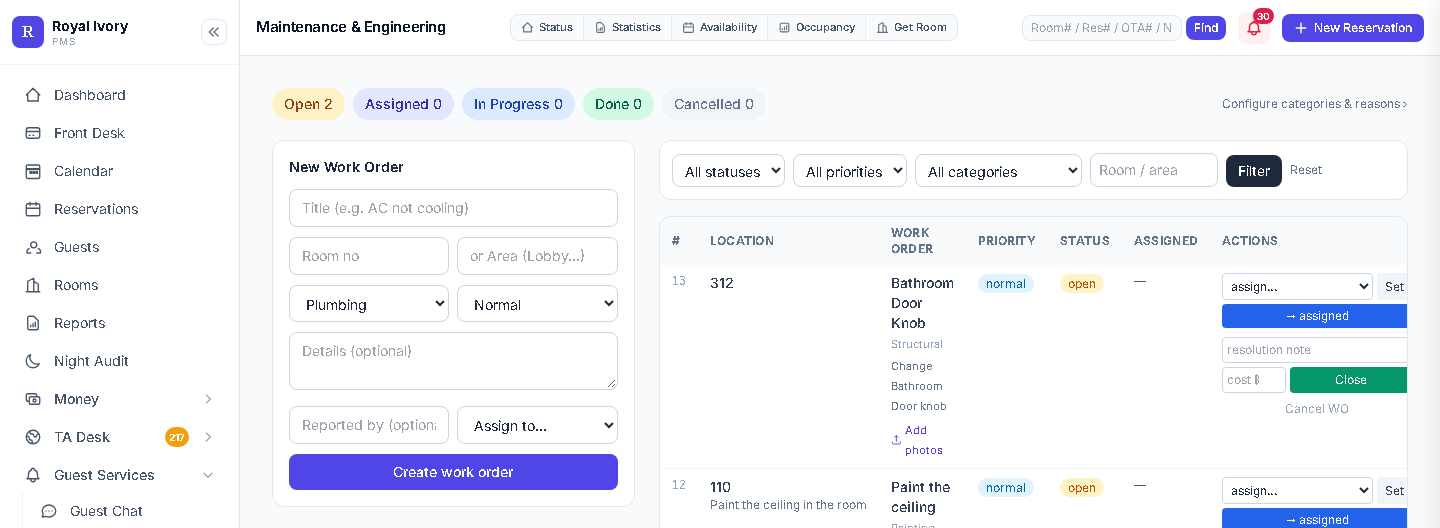
The categories and reasons your engineers pick from are configured from a link on the screen itself, next to the work orders that use them.
 1
2
3
4
What the numbers mean
- Status counts. Open, assigned, in progress, done, cancelled.
- Configure categories and reasons. The link that opens the list.
- New work order. Title, room or area, category, priority.
- Filters. By status, priority, category or room.
A new category, Plumbing or Lobby for example.
- ask for the list to be changed
- wait
Open the link, edit the list of categories and reasons, carry on.
- you, on this screen
Staff roles and sign-in
administrator
- Built-in roles
- 8
- Assigned by
- An administrator, to each person, at any time
- Applies
- Immediately
- Remote sign-in
- Google accounts on an allow-list an administrator keeps
- Second factor
- An authenticator-app code can be required per person
Access for a new night auditor.
- ask for an account
- wait
An administrator picks one of the built-in roles. The change applies immediately, so autonomy for you does not mean an open door for everyone.
- you, as administrator
Night audit and backups
Night Audit
- Backups
- Automatic and hourly in normal operation
- Kept
- The most recent 48, on the property's server
- Restore
- An administrator, from the Night Audit page
- Closed cashier day
- Payments from it can only be changed by an administrator
- How it decides
- Visible rules and thresholds, not an opaque model
Restoring a backup.
- find someone to call
- wait
An administrator restores from the Night Audit page, without calling anyone.
- you, on this screen
Extension API and tokens
administrator
- Issued by
- An administrator, for the add-on or integration you choose
- Limited to
- Approved addresses
- A token can
- Propose charges, which staff approve
- Revoked by
- An administrator, whenever you decide
- Channel manager
- Connect your own through the API
Giving an add-on access.
- ask for a key
- wait
Issue a token, limit it to approved addresses, revoke it when you are done.
- you, as administrator
What owners say about running their own settings
These are sample reviews, written as stand-ins until we have collected real customer reviews. Read more sample reviews.
Sample reviews, pending real customer reviews"I used to keep a consultant on retainer for rate changes and report requests. Now I edit rates in Settings and build my own reports. When I am stuck I still write to support, and a person answers."
"On the rate formula page I can add an early-bird discount for a date range without asking anyone. It is a rule I can read, not a black box."
"I get to my own numbers through the report builder. I choose the columns and the date range, save it, and run it again next month."
What is real: Royal Ivory Nana Hotel, 91 rooms in Bangkok, runs this exact system with every setting owner-managed, no vendor ticket, day to day.
Frequently asked
What if I still want help sometimes?
Support is there when you want it. The point is that routine changes don't require it anymore, not that help disappears.
Can I restrict who on my team changes what?
Yes. You assign each person one of the built-in roles, and the change applies immediately.
Is there actually an audit trail?
There is an audit log of key actions, and it records the signed-in user for the actions it logs. Charge proposals made through an API token are logged under the token's name.
Does this replace our channel manager?
No. It connects to your channel manager via API, on your terms. We are not yet a certified reseller-level OTA connectivity partner for every channel manager, and we would rather say that plainly than oversell it.
How much does it cost?
$100 per property per month, which covers up to 200 rooms. Rooms 201 to 300 are $0.50 each and rooms above 300 are $0.30 each. The whole core PMS is included at every size, so there is no price for unlocking settings or reports. Moving in is free, and so is video training for your team. The first two months are free, with no fees and no card. See thepricing page or start a free trial.
Request your setup
Tell us about your property and what you're currently paying someone else for. A person replies within one business day and sets the hotel up with you; no account is created automatically.
- Send the form
- A person replies
- You see the settings that would be yours
From $100 per property per month, up to 200 rooms. See pricing