 Orca Systems
Built by a hotel that already left Hotsoft.
A 91-room property in Bangkok ran Hotsoft for years, then replaced it with this system and moved operations over for good. It is the hotel's production PMS today, not a pilot.
Legacy PMS vendors made you ask permission to run your own hotel.
Every change is a ticket
A rate tweak, a new report, a seasonal price change: each one is a request to a vendor or consultant, then a wait. The hotel runs on their schedule, not yours.
The software looks its age
Legacy PMS interfaces were built for a different decade. Staff route around them with spreadsheets, which is its own kind of risk.
Switching feels like the bigger risk
Years of bookings, rate history and guest records live in the old system. Nobody wants to be the owner who migrated and lost something.
One system, run by the owner, proven in production first.
This is a complete hotel PMS: reservations, front desk, cashier and night audit, rate and seasonal pricing, a travel-agent portal, guest identity capture, role-based staff access, and the financial and government reports a Thai hotel actually has to file, including the TM30 immigration export. Every setting lives in the owner's own dashboard. Nothing routine requires a support ticket.
It did not start as a pitch deck. It started as the replacement for Hotsoft at a real, currently-operating hotel, and the product sold to other properties is the same system, not a simplified version of it.
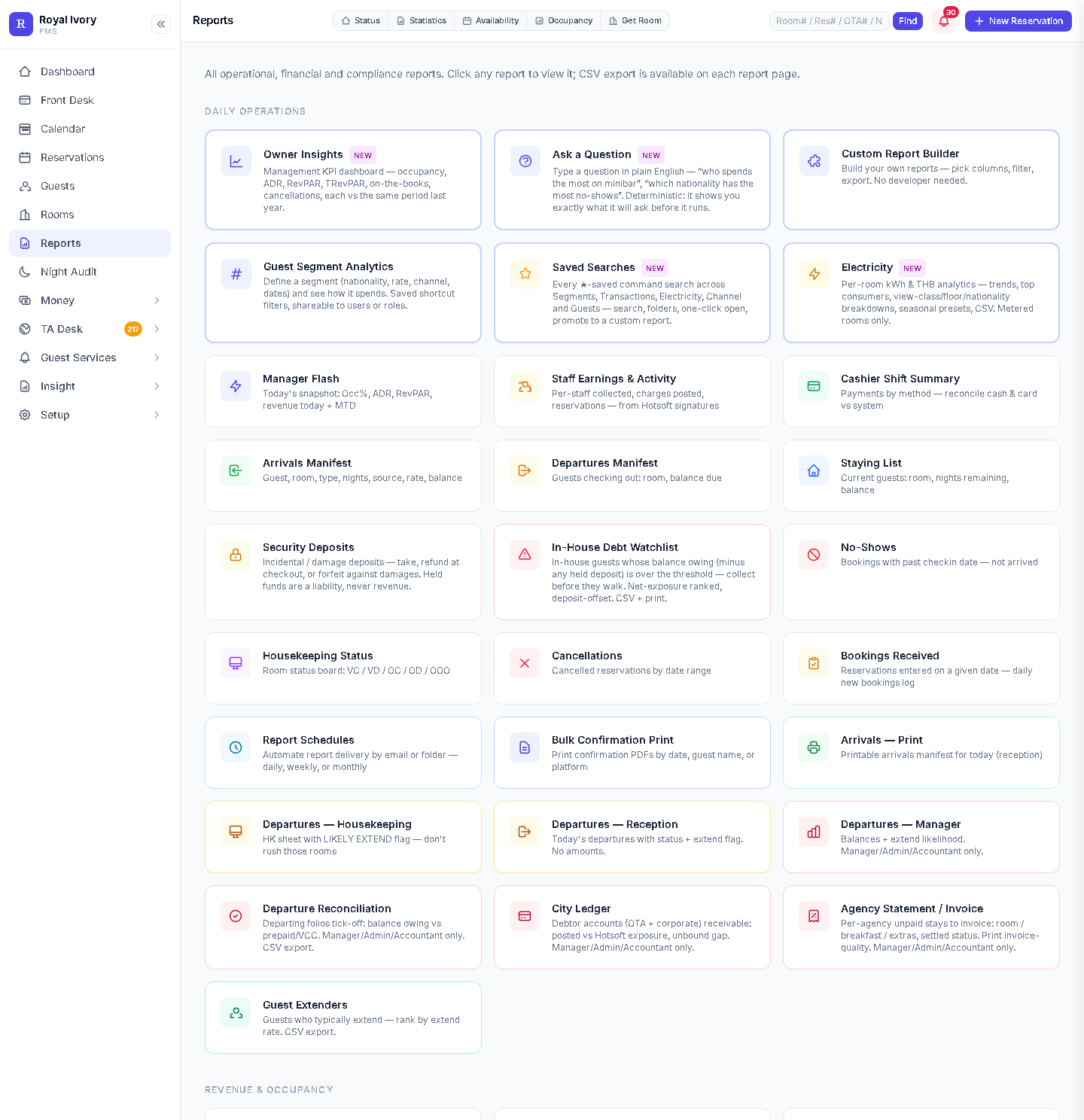
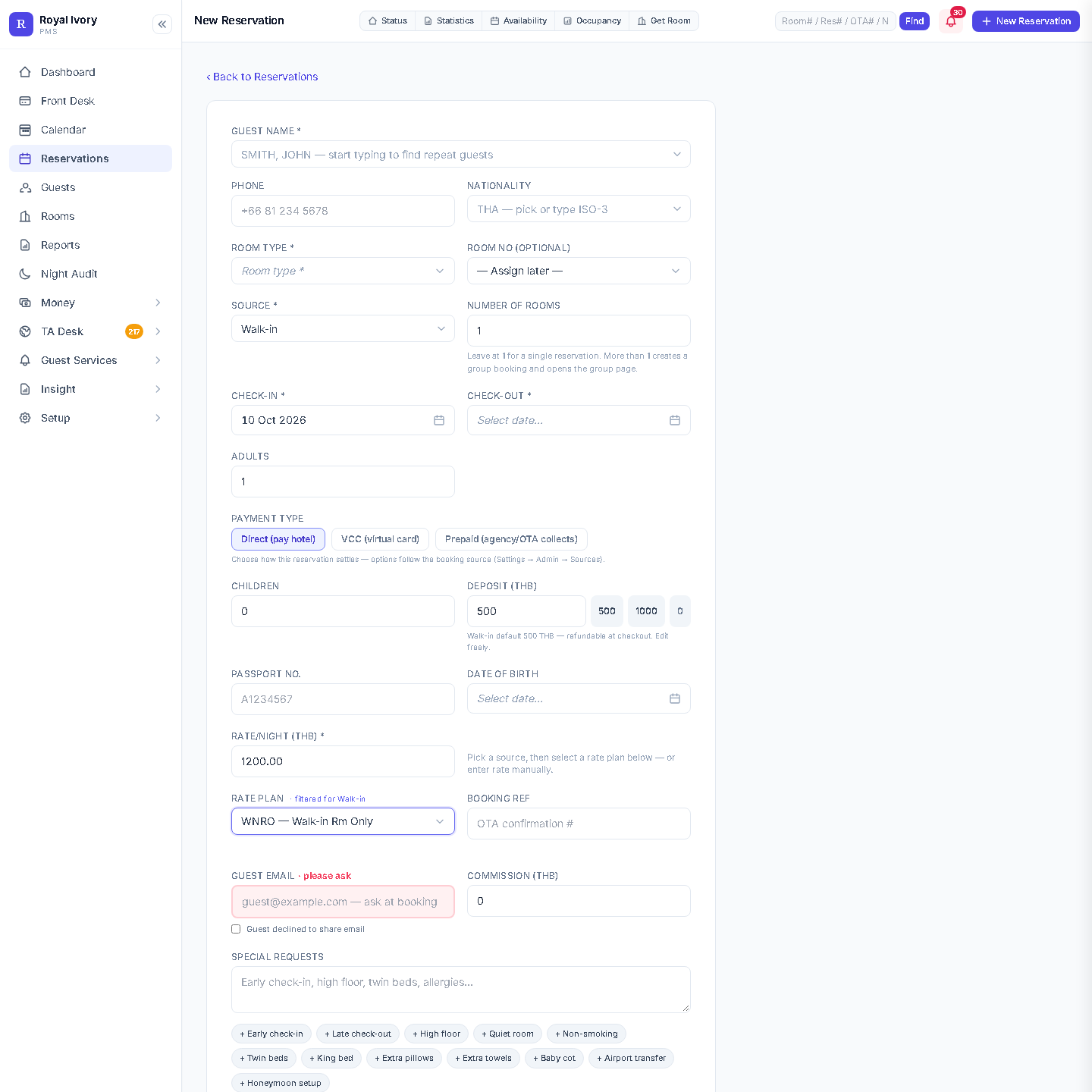
What the screens actually look like
Screens from the system running at Royal Ivory Nana Hotel, cropped to leave out guest and financial data.

What changes when you stop waiting on a vendor
| Routine task | Some legacy systems | This system |
|---|---|---|
| Change a rate or seasonal price | Sometimes a request to the vendor | Owner edits it in Settings, live immediately |
| New or custom report | Sometimes a paid customisation request | Ask a plain-English question, or build it in the report builder |
| OTA statement reconciliation | Sometimes a manual spreadsheet cross-check | Upload the statement, the system matches it and flags gaps |
| TM30 immigration report | Sometimes compiled by hand from the guest register | Generated from check-ins on the current business date |
| Staff access change | Sometimes managed by the vendor | Owner manages roles directly |
| Backups | Varies by vendor and contract | Automatic hourly backups, the most recent 48 kept on the property's server, restorable by an administrator from Night Audit |
The complete operation, not a reservations widget
Reservations & front desk
Booking calendar, check-in and check-out, room status and walk-ins, with rate plans filtered to the booking source automatically.
Cashier & night audit
Shift open and close, payment reconciliation by method, and a night audit that shows exactly what will post before you run it.
Reports, without a developer
Owner Insights, Manager Flash, Channel Report, and a plain-English "Ask" tool that shows you the exact query before it runs anything.
Rate & seasonal pricing
Flat rate plans, date-based seasonal overrides, and early check-in / late checkout pricing tiers, all owner-editable.
Travel-agent self-serve portal
Agents log in with their own code and see their own negotiated net rates, without a staff member in the loop.
Guest identity & TM30
Passport capture and the daily TM30 immigration export Thai hotels are required to file, generated from real check-ins.
Roles, sign-in & audit log
Role-based staff access and a sign-in service the owner controls; changes to users, roles and money are logged.
Backups & inventory sync
Automatic hourly backups, the most recent 48 kept on the property's server, plus inventory and rate pushes to your channel manager via API, on your terms.
How hotel teams describe leaving a legacy PMS
These are sample reviews, written as stand-ins until we have collected real customer reviews. Read more sample reviews.
"We left Hotsoft after years of opening a ticket for every small change. The first rate edit I made myself took a minute. We ran the old system next to the new one for a while and compared the numbers before switching, so there was no leap of faith."General manager55-room city hotel, Udon Thani
"Reconciling OTA statements was a spreadsheet job I dreaded. Now I upload the statement and it shows me the lines that do not match. Payments from a closed cashier day can only be changed by an administrator, which is what I want when I close the month."AccountantServes a 45-room hotel, Chiang Mai
"What I missed in the old system was seeing what night audit would post before it posted. Here the preview comes first. If I disagree with it, I stop and fix it."Night auditor120-room hotel, Hat Yai
"Training was shorter than I feared. The room grid is easy to read and rate plans follow the booking source, so my team stopped asking me which rate applies."Front office manager75-room resort hotel, Phuket
What is real: Royal Ivory Nana Hotel, a 91-room property in Bangkok, replaced Hotsoft with this exact system and runs its day-to-day operations on it today. That is a factual, verifiable reference, not a sample.
See your own rate plans on it, not a demo tenant.
Bring your room count and rate structure. We will walk through how a Hotsoft migration actually works for a property your size.
From $100 per property per month, up to 200 rooms. See pricing
Frequently asked
Will we lose our booking and rate history moving off Hotsoft?
Migration is a planned, walkthrough-based step, not a flip of a switch. We will talk through exactly what needs to move for your property before anything happens.
Does the system connect to our existing channel manager?
It connects to your channel manager via API, on terms you control. We are not yet a certified reseller-level OTA connectivity partner for every channel manager, and we would rather tell you that plainly than oversell it.
How much does it cost?
$100 per property per month, which covers up to 200 rooms. Rooms 201 to 300 are $0.50 each and rooms above 300 are $0.30 each, so 250 rooms is $125 and 400 rooms is $180. The whole core PMS is included at every size. Moving in from Hotsoft is free, and so is video training for your team. The first two months are free, with no fees and no card. See thepricing page or start a free trial.
What optional add-ons exist beyond the core PMS?
Electricity monitoring and a guest-facing web app are installed at our own hotel and are being prepared for other hotels. They are not on sale yet. The housekeeping board is part of the PMS, and staff location is in development.
Who do we call when something breaks at 11pm?
We do not advertise round-the-clock support. Support is handled directly by the team behind the system, not routed through a reseller layer, and support hours for your property are agreed on the walkthrough call.
Request a walkthrough
Tell us about your property. We reply within one business day with real next steps, not a sales sequence.